Sunday, July 18, 2010

virtual-win-lab-mgmt is now open-source

virtual-win-lab-mgmt permits an easy virtual lab deployment and management in a minimalist Hyper-V environment: even without an Active Directory domain or without tools such as SCVMM.

Initially developped within 3 days, virtual-win-lab-mgmt already was 900+ PowerShell SLOC long. This tool was widely used for preparing and managing the virtual labs of the Microsoft TechDays 2010, Paris, France.

This project is hosting on the Google Code repository.
Link: https://code.google.com/p/virtual-win-lab-mgmt/


Saturday, July 17, 2010

Secure and easy ucarp ip-failover using ucarp-multi

ucarp-multi is an extension to the ucarp package, providing an easy way to set-up ipv4 failover within several hosts, and for several sub-interfaces.

This package is hosted on https://code.google.com/p/ucarp-multi/

Thursday, July 1, 2010

Voyage-Sncf: security design flaw

Voyages-sncf.com, the trip reservation website of the main french rail company, is one the most important websites on the french IT market. Each day seven thousands of train tickets are bought on that precise website.

How crazy is it that my browser was telling me "This is a non-secure form".. blabla (see the screenshot above)?
Since I already was on an https webpage, I figured the form was sent unencrypted...


It would be too much unbelievable to be true. Maybe is-it a Safari bug?
However, after having a quick look at the source code, - by the way please double check the highlighted URL - where the form is submitted:

This is just crazy! The form is sent to an uncrypted webpage (the URL does start with http:// and not https://) After some recent privacy issues with a lot of names released cause of a lack of security issue, I just find it unbelievable such lack of rigor in the way programmers did build this application.


Tuesday, June 29, 2010

Random thoughts to improve voice recognition

As stated once more, and this time on this ITWorld article, relative to Google making Google Voice available to SMB, improvement still has to be done on the voice recognition topic.

More and more editors already did add a voicemail to email transcript service. A service, of which precision is not really the main concern: sometimes even numbers are not correctly recognized!

Just a thought on that topic, maybe researchers could:
- add several noise filters
- recognize the language
- recognize the accent
- build a recognition model for each language and for each accent, or at least a global model for each language, and a global one for each accent
- train these models on a representative set


Monday, June 7, 2010

DNS dynamic secure updates credentials

As soon as Windows Server 2003, Microsoft introduced the DNS dynamic secure updates.
This mechanism permits authorized hosts such as DHCP servers, for instance to update DNS entries, thus resulting in a lot of "automatically-managed" DNS records. Thus reducing the amount of manual administrative tasks.

In order to configure this mechanism:
1/ create an update account, member of the DnsUpdateProxy security group
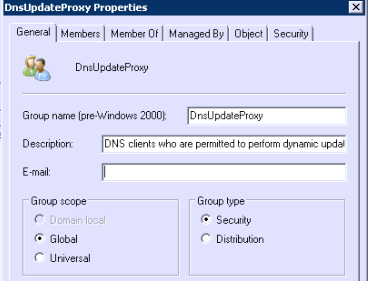
By default, the DnsUpdateProxy security group is located under the container Users of your domain.

In my example, I created an account named DNSSecureUpdateAccount.
You then have to update its group membership to set it as a member of the DnsUpdateProxy security group.
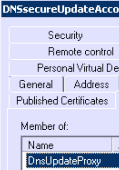
Also keep in mind there are several security consideration regarding the password complexity and the password expiration of this account. You should think twice about these factors.


2/ configure DNS secure updates credentials in the DHCP snap-in
Within the DHCP snap-in:
- right-click IPv4
- then go to properties
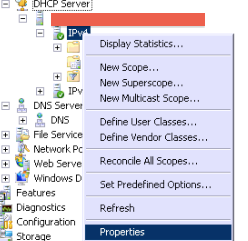
- then the Advanced tab

- then on the Credentials button, fill in the user account previously created.


3/ enable DNS secure updates
- go to the DNS tab
- under "Name Protection", click on the "Configure" button
- then check the box according to the screenshot:
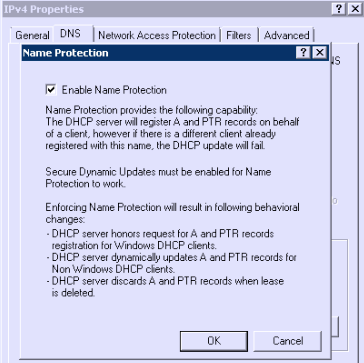
- The DNS tab now does look like:


4/ Only allow dynamic secure updates in your DNS servers
- foreach DNS server:
- within the DNS snap-in:
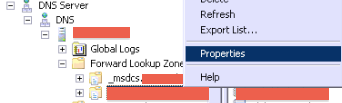
- navigate to the Forward Lookup Zone, then to your domain
- right click > Properties
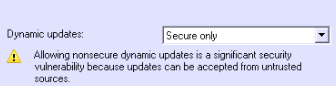
- Then under "Dynamic updates" set them to "Secure only"

5/ Enjoy !
Just as a test,
- I turned off a domain computer named vm1 (which was DHCP configured) (actually it was a virtual machine ;)
- then I manually deleted its DNS record on all DNS servers
- I also scavenged the records, and cleared the DNS caches
- nslookup vm1 : no entry
- I then powered it up and did a DNS lookup, and it just worked like a charmed!

Saturday, February 27, 2010

FIM 2010 - Exchange 2010 provisioning made easy with RC1 update 3!

One month ago, FIM RC1 - update 3 was released. Among its various improvements, there is now an official capability for Exchange 2010 provisioning. Before this update, an easy method only did exist for Exchange 2007 mailbox provisioning. Sure with some tricks and a lot of patience, it was also possible to provision Exchange 2010 mailboxes, but it was not really straight forward.

In that post we will see how to provision Exchange 2010 user mailboxes. And we will discover how easy it actually is!


1/ Management tools
When we wanted to provision Exchange 2007 mailboxes, we had to install Exchange 2007 Management Tools on the FIM Sync server. A nice surprise is that there is no such need for Exchange 2010, since the interfacing between the FIM Sync service and the Exchange servers are made using powershell calls over https.

2/ FIM Sync server settings

- launch the Synchronization Service Manager program
- Tools > Options
- then configure the options as shown on the following picture:

- then on the Active Directory Management Agent which will be used for Exchange 2010 provisionning, go to Configure Extensions.

- set "Provision for:" as "Exchange 2010"
- below enter the exchange 2010 RPS URI (something like http://FQDN/powershell )

- then validate


3/ Exchange servers settings
-
the AD user account used for the AD management account which you want to use to provision mailboxes has to own some priviledges on the Exchange infrastructure.
- navigate to the exchange control panel (ECP): http://FQDN/ecp
- Admin Role Groups > Organization Management
- Add the FIM ADDS MA to the "Organization Management Group" (a group with less permissions could also work, but don't have time to check this out, since I am no Exchange 2010 expert. I guess just the permission to create mailbox would be enough)

4/ Synchronization rule
For the sync rule used to initially create or to update AD users, you have to define an Outbound flow for the following AD objects attributes:
- MailNickName
- msExchHomeServerName
- homeMDB

Please note the last two values depends on the exchange 2010 server and database to which you want to create the user mailbox.
If you don't feel comfortable with this, I advise you to get some informations from the Exchange 2007 provisioning with FIM 2010 RC0 webpage.


5/ Done!
-
in order to check if your MPR, Workflow, and sync rule related to provisioning Exchange 2010 user mailboxes works, do the necessary stuff in order for the previously configured sync rule to apply.
- Then after the synchronization process you defined is done, logon as the user you just created
- open Outlook